Are you stuck in an AI content trap?

The AI Content Trap

Is letting artificial intelligence do your thinking gradually killing your brand (& your brain)?

A “BRAIN FART” about what’s going on around us at the moment.


AI content tools are everywhere and the pressure to use them is very real. Competitors are churning out blog posts, LinkedIn updates and email newsletters at a ridiculous rate, that frankly would have seemed impossible a relatively short time ago. The temptation to try and keep up by letting AI do the heavy lifting is completely understandable, and to be fair makes sense. I’ve certainly dabbled more than a little, and will continue to!

But… there’s a real problem starting to appear and I’m sort of pleased and reassured to see it. It’s a potentially expensive and damaging problem.

Too many businesses are using AI as a replacement for old fashioned brain power, rather than as a support tool. They’re typing vague prompts, copy and pasting the output then hitting publish, and moving on without a backwards glance. All too often there’s absolutely no evidence of a critical eye at play, a personalised rewrite or “does this actually sound like us?” questions being asked.

And audiences? They’re definitely noticing. The more AI spam we’re subjected to the more attuned our radars are becoming.

We’re sinking in a AI content flood we’ve not asked for…

We are in the middle of an unprecedented content glut. AI has made it cheaper and faster than ever to produce a never ending noisy babble, but what we are all too often failing to recognise is that volume and value are not the same thing.

When we all have access to the same tools that have been trained on the same data, generating content using the same sentence structures and the same tired, generic, waffly phrases (“In today’s fast-paced business landscape…” — sound familiar?), everything starts to blur together and content consumers glaze over.

We are completely disregarding the fact that our potential clients are savvy. They read a lot, consume mountains of content on social media and websites. They’ve seen the patterns and recognise them, they can smell generic AI copy from a mile off.

The result?

We’re churning out content that technically ticks a box but does absolutely nothing to build trust, demonstrate our expertise, or make anyone feel like they’ve found the right person to work with by offering that personal sense of connection.

The brand voice problem: When your content sounds like everyone else’s…

Your brand voice is one of your most valuable business assets. It’s what is truly unique about you and your business. It’s developed over time through combining your experience, your values, a knack you have for demystifying complicated the things you genuinely care about.

AI doesn’t know any of that, even if you think you’ve “programmed it”, if I had a pound for every client who sends me AI answers to basic questions about their businesses to enable me to build their websites I’d be far better off than I am. They land in my inbox and I instantly know this bears no correspondence to the person I’ve been chatting with in person. Their clients will see that too.

AI knows patterns, it knows what a “professional” blog post is supposed to look like. It knows how to structure an argument and use appropriate vocabulary, but it doesn’t know:

  • The specific frustrations or pain points in their own words that your clients come to you with
  • The stories from your own career that make a point land because they’re nuanced, human and connect
  • Your dry sense of humour (or lack of), your directness, polished professionalism or your warmth
  • The particular way you’d push back on an assumption and not just regurgitate standard talking points
  • Why you started doing what you do in the first place, granted this may be “programmed” but it’s not your voice.

When you skip the editing process — when you treat AI output as a finished product rather than a rough draft — you publish content that technically represents your business but doesn’t actually sound like you. It sounds like a version of everyone. And that sameness is its own kind of invisibility.

The credibility risk nobody’s talking about…

The lack of an authentic voice though isn’t the only thing we need to be aware of, there are more serious concerns.

AI makes mistakes, it doesn’t hide this, it’s in small print at the foot of the page. It presents these inaccuracies or outright inventions with complete confidence and a persuasive sense of authority. It can misrepresent industry nuances, cite things that don’t exist, or give advice that’s subtly (or not so subtly) wrong, particularly in specialist fields.

When you fail to carefully read what you publish, you need to be ready to own those mistakes. Your name is on them and they directly impact your reputation and credability.

It creates an ever snowballing trust issue. Clients who work closely with you or potential clients who are consuming your content will notice over time, if your published content and your actual thinking are completely different. If your emails and conversations are warm, specific and direct, but your blog posts read like they were written by a corporate robot, that gap creates a  deeply ingrained unease. They inevitably start to question who the real person behind the brand actually is?

Authenticity isn’t just a “nice to have”, in a world drowning in synthetic content  it’s a genuine competitive advantage.

The cost: Are we outsourcing our own intelligence?

This is something that I think most of us are choosing to ignore, it’s so addictive having the “ease” of AI at our finger tips that we aren’t looking any further.

Strategic thinking is a skill. Like any skill, it strengthens with use and weakens with neglect. Sports players don’t get better by just watching sport, they have to work consistently on maintaining their body, their tool. I know that analogy reverses the role of the body and brain but I think you’ll know what I’m getting at.

When you sit down to write something on a blank page, you’re forced to think and use the grey matter. You have to clarify your own position, decide what matters and what doesn’t. You have to organise your thoughts in a way that makes sense to someone else. That process is not just the means to an end. The process itself is where insight lives, it’s often where we stumble on insights that lead us to further improvements and opportunities.

When we outsource that to AI, we skip the thinking part, the brain work. We get a polished professional looking output without any of the cognitive work that would have sharpened our ideas, revealed a gap in our reasoning, or sparked an angle we hadn’t considered before. Ultimately if wer’re honest and look past the shine, we can feel how hollow it is.

If we do this often enough, something inevitably shifts. The habit of sitting with a problem and working through it independently, rigorously is a skill that starts to disappear, we loose the ability to think clearly. We start reaching for the AI tools before we’ve even attempted to do the thinking for ourselves. It reminds me about the whole using calculators for maths at school argument, they weren’t wrong.

This isn’t intended as scaremongering or doom and gloom. This is just what happens when we consistently choose shortcuts over skills. The skill fades and it’s something we need to recognise.

For business owners and professionals, where strategic and creative thinking is literally our unique product and service, this is not a minor concern.

The case for AI: It should be a tool, not a crutch…

None of this means AI content tools are useless or dangerous, in fact when used well, they can genuinely help us enormously.

Here’s where AI earns its place in our daily business lives:

Research and starting points. Stuck on where to begin? AI can give us a structure, a list of angles, an overview of a topic we’re less familiar with. We can use it to get the ball rolling then step up and take over.

Overcoming the blank page paralysis. Sometimes a rough first draft, even it’s a bad one is the best place to start to unlock our own ideas. AI can give us something to react to.

Repurposing and reformatting. Turning a long article into a summary, adapting a talk into a blog post, pulling key points from a longer document… these are mechanical tasks where AI adds genuine value without replacing your voice. It doesn’t dumb us down, it just short cuts a longer task. It should or course be checked to ensure that AI hasn’t left out critical information in a summary, I’ve learned that the hard way.

Editing and refinement. AI can be a useful second eye for grammar, structure and clarity, as long as we’ve written the substance ourselves. That way our own voice and views still dominate but in a slicker more polished format

Handling repetitive, lower-stakes content. Some content is functional, not expressive. FAQs, product descriptions, standard process documents, it can be argued that there’s less at stake here, and AI can reasonably help. These are though still pieces of content that offer opportunities for real connection through the inclusion of authentic personality.

The key in all of this is AI as a starting point. AI should be the beginning of your content process, not the end of it.

What staying authentic actually looks like in practice…

Please don’t get me wrong, being authentic online doesn’t mean writing everything from scratch with no tools. For me what it means is ensuring that what you publish genuinely represents your thinking, your experience, and your voice.

Here are five practical steps to follow to sense check your use of AI:

1. Always read it before you publish it. Ideally say it out loud, you’ll instantly be struck by any sentence that makes you think “I would never say it like that”. When you have that realisation, stop and change it.

2. Add one thing AI could never know. A personal story, a client situation (anonymised of course), Your honest opinion on a contested point in your industry or something that could only come from you.

3. Write the first draft yourself, at least sometimes. It doesn’t matter how rought and ready it is, the starting point is yours. The thinking that happens in that process is definitely worth protecting.

4. Have a voice guide. Ensure you know and consistently use the key characteristics of how your brand sounds. Your vocabulary, your tone, the topics you wouldn’t touch with a barge poll, the beliefs you hold. Use it to sense-check AI output before publishing.

5. Ask: “Would my best client recognise this as coming from me?” If the honest answer is no, don’t post or hit publish.

The opportunity for us in AI…

There is good news!

Because there’s so much content out there right now that is AI-generated, mediocre, and interchangeable, indentikit… there is a genuine gap in the market for content that isn’t.

There’s a hunger for content with an original point of view, shared by a real person, that imparts hard earned experience or knowledge, tells the truth, and trusts the reader to be intelligent.

That  sort of content hits differently and builds genuine trust. It attracts clients who are aligned with your values and your approach. It differentiates you in a sea of sameness. It builds over time in a way that formulaic AI output simply cannot.

The businesses that will stand out over the next few years won’t be the ones who used AI the most. They’ll be the ones who used it wisely, and never confused it for a substitute for their own thinking.

In conclusion…

AI is a powerful tool that can build things or damage them, depending on how it’s used.

Use it to support your thinking but NEVER to replace it.

Use it to speed up process NEVER to skip the important details.

ALWAYS make sure that what you publish sounds like you, not like a very efficient but boring algorithm trying to sound like a slick know all professional in your field.

Your voice, insight and integrity are not something to be sacrificed in the name of optimised efficiency.

They are what make you and your the business what they are.

If you enjoyed this please share it with someone you know who needs to hear it.

If you’re struggling to find your website content or wondering whether your current approach is working as hard as it should be let’s have a conversation.

Book a Power Hour or a Website User Review and see your website through a potential client’s eyes, does it stand up to scrutiny?

How long does it take to build a website? Weeks or months?

How long does it take to build a website? Weeks or months?

“How long is a piece of string?”

  • Are you building your website yourself?
  • How many pages are involved in your plans?
  • Have you content to load from an old site?
  • How prepared are you?
  • Have you got all the images ready?
  • Have you got the content you need?
  • Is your branding sorted?

You’ll see a huge trend for “Website in a day” services

This service is absolutely great if that is what you need and it can certainly be achieved by an experienced professional who has liaised heavily with you in advance to ensure that all elements are ready and prepared ahead of build day. What I should point out is that any website supplied under this form of arrangement will likely be template based (customised to your branding of course) but not a bespoke design, that simply isn’t possible within those time constraints.  It may require some compromise but this would be offset by a very quick turnaround of a live site.

Don’t kid yourself that this is everything in a day, you do need to factor in plenty of time ahead of the “day” to get everything in order.

If you are trying to build a website in a day as a newbie, I don’t believe this is possible (unless it’s a very small one-pager) unless you are a well-researched tech wizz with design experience and a comprehensive plan, and a lot of prep done.

So what is a realistic timescale for building a website?

From personal experience and the feedback I’ve garnered, 4 months to a year or more for self-builders, though all too often many sites are shelved long before completion and work handed over to a professional or techy contact.  

For a professional site (up to about 9 pages) 4 to 6 weeks but again this is very dependent on timely delivery by yourself of all the elements that the designer needs. Delay in supplying the materials requested will inevitably lead to your job being sidelined for a job where the client has everything ready and waiting to go so the designer isn’t sitting idle.

Whichever route you choose to go I’d say these 3 things…

1 Don’t get too hung up on the tech to start with, the biggest priority should be understanding your business strategy for the next few years and how your website factors in that and supports it.

2 Don’t underestimate the length of time you need to plan, whether you are self-building or commissioning a website designer you need one.

3. Work out which route is the most productive use of your time. People often wrongly perceive that the DIY route is free. Not only is this untrue in terms of hosting, software, etc (there are generally hidden costs you’d not thought of) but your time also comes at a cost.  What else could you be doing with that time and what income would it be generating?  If you are going to plough several hours a month for 8 months into a website that ultimately isn’t properly designed or structured (don’t get me wrong, it might be a technical, marketing, design masterclass and if so brilliant) is it going to earn you back the cost of your time invested in its construction, or the costs to bring someone in to help with rejigging it?

I’ve experienced both routes and have experienced good and bad with each. It’s very much a personal and business decision. I’m not here to push in one direction or the other but I am here to support you in whichever route you choose.


Would you like some friendly impartial advice about what could work best for you?

Why not book a…

5 Reasons you should be blogging for your small business

5 Reasons you should be blogging for your small business

I’ve got to confess, for years I resisted blogging for years. I’d had a website almost 10 years before I caved and started my blogging journey and to be honest, I did it pretty badly until I got my head around the whole thing.

The majority of my blogging to date has been for my Millinery and Bridal Accessories business, writing on websites is a newer venture, as is the business. That means however I have the knowledge and practical experience to write this post from a user’s perspective as a small creative business, not just as a jargon-savvy website specialist.

I told myself I hated writing, I wasn’t a good writer, nobody would be interested in anything I had to say, I was too busy for stuff like that, I couldn’t be bothered, etc…..

Lots of “I”’s there. I’d simply failed to understand what blogging was and how it would serve my business, what a fool I’d been, once the penny dropped it suddenly clicked and I realised how much opportunity had slipped me by but it’s never too late to get started.

Since I trained myself to see blogging for business as a game rather than an indulgence, I’ve never looked back.

Ultimately we are all in business to make money, whatever our motivations, ambitions, etc. Blogging is a great way to support that end goal.

1 Blogging to drive traffic to your website

Your website is the hub of your online business (or should be – I wrote a post clarifying why) and as such you want as many people to visit it as possible. A blog used properly is a key tool to achieving this desired outcome.

A blog post is just the start…  Each blog post is the starting point of an ecosystem of related content that should all track back to it. Just think for each blog post you create, the following marketing collateral can be created, 2 or 3 feeder posts for Instagram, Facebook, Linkedin, and Twitter. Pinterest posts that link back are great for increasing reach. Perhaps you could repurpose it for a podcast or Youtube. Don’t forget to send details to your email list. That’s a whole lot of content you can derive from one post!

It’s not just about driving traffic from those who already follow you through. It’s about capturing the attention of those who don’t even know you exist but showing up the results when they are going to Google for answers and solutions.

2 Blogging to establish authority & expertise

With each blog post, you create you are brick by brick building your business reference library. A permanent repository of informative and helpful information and resources, each of which further establishes your credibility as a go-to expert in your field. From personal experience of blogging for my millinery and bridal accessories business, my advice posts often led to me being asked to contribute to magazine features and style advice columns, great exposure for me and my brand!

I like to think of each blog as a book added to a shelf in a reference library that is indexed and can be found forever, whereas a social media post is more like a flyer in a leaflet stand at the entrance to the library. It will probably get picked up but those both interested and not, are glanced at and discarded from memory whereas a blog post will always be there to answer their questions when they go looking for answers.

Don’t get me wrong, both are necessary but have different levels of impact and legacy.

3 Blogging to build relationships with your niche

Whilst it’s great that you’re sharing knowledge and information in your blog posts there should also be something deeper going on if you’re getting it right. I’m not pretending this is something that comes instantly though I would argue the less you overthink it, the quicker you’ll get it right.  What am I blethering about? Human connection is an all-important factor in building that critical know-like and trust factor with your niche. 

Blogging is the perfect opportunity to share not just information but the character and personality of you and or your business. This might well mean that you repel some people and that’s totally fine. If they don’t like your approach they were never going to be your perfect clients anyway, but on the flip side, those who are your “people” will feel instantly comfortable and connected. They’ll feel safe, understood and loyalty builds quickly.

Harking back to my millinery bridal blog I have a particular post in mind that proves this point perfectly, it was written about hair accessories for the older bride. This post alone is responsible for around 30% of my clients and when they email or ring me the first thing they say is that they’ve read my blog post and they knew instantly that they’d found the right person to go to, who would understand their needs, they felt relieved, and that they couldn’t wait to order. The power of a well-planned blog post! The decision to purchase is made before they’ve even decided which piece to order.

4 Blogging to increase website SEO

Don’t get frightened by this, it’s often built up to be a much darker art than it needs to be. Granted there are advanced levels that require more skill but at the entry level, for most small businesses it’s as basic as answering the questions your potential clients are asking. The more questions you are answering the more chance you have of the right clients finding you. A blog is a perfect place to build this framework.

With a small amount of research, recall of the conversations you have repeatedly with new clients, and imagination – putting yourself in their shoes and you’ll quickly come up with a whole raft of titles that reflect the questions that people are typing into Google. If you’re using the same words you’ll come up in the results because you are providing answers to the commonly performed searches.

5 Blogging for long-term growth & it’s free

Ok, full disclosure…. A new blog post is unlikely to see you hit page one of Google overnight it’s a slightly longer-term game but each post is getting you nearer. My post about hair accessories for the older bride probably took about a month to get to page one but it’s now been the top result on Google for 3 years now, not bad for an hour of my time and no financial investment in ads, boosting, sponsoring, etc!

Blog with strategy and you WILL see results.


Ready to raise your blogging game?

Learn more…

Most important thing you need to know about your website!

Most important thing you need to know about your website!

(In my humble opinion)

Your website shouldn’t be about you!

What, of course it’s about me/my business otherwise what’s the point?

At the risk of repeating myself, your website isn’t about you, or at least not at first glance.

So who is it about?

Simple, your customers, without them, you don’t have a business.

There’s something I really need you to remember when you’re creating your website, the people likely to be visiting it are SELFISH. No, I’m not being rude or offensive, I’m simply being practical and I want you to do the same.

Just think -You’d go to Google to find websites…

  • If you’re wanting to find recipe inspiration

  • If you’re looking for a specialist mattress for a bad back

  • If you’re looking for a beauty therapist who offers a particular treatment

  • If you’re looking for a restaurant recommendation in a city you’re visiting.

In each of those instances, you’ll type in your needs, requirements, or concerns. 

When the results pop up you’ll click on whichever link tempts you (that’s a story for another day) and when you land on the page, in less than a second you’ll have an instant gut reaction that will keep you on the website or have you clicking to the next one.

I’m not going to lie, great webdesign matters…

A gorgeous image, beautiful design, and clear layout all impact this snap decision but crucially your subconscious is looking to see if that person understands your needs, can meet them, and how to go about it. If your website isn’t addressing this clearly in your copy at the head of your page, then chances are you’ve lost them, even if in reality you would have been their perfect match.

People simply aren’t interested in you until they know whether you’ll be able to help them in the way they require. Until you’ve convinced them that it’s worth hanging around to find out more through clear and direct copy and messaging, introducing yourself becomes self-defeating.

Potential clients don’t want to be “Welcomed” to your site, they assume that’s a given, nor do they want to know that Sally Jones likes dogs and clifftop walks until they know that she’ll be looked after and their needs.

Take a look at your website (if you’ve built it) and see if you’re falling into this trap. Don’t worry, you’d be in good company, it’s an incredibly common mistake.

Hope that makes sense!

PS Just to clarify, they are likely to be lovely people really but it is their needs, not yours that have taken them to the internet for answers and solutions.


Would you like to see your website through a stranger’s eyes and get some friendly impartial feedback and advice?

Learn more about my…

Where do you start with building a website?

Where do you start with building a website?

Planning to build your own website?
Where on earth do you start?

If you type this question into Google, you’ll invariably be met with a whole host of responses about buying your Domain (URL), choosing your platform and sorting hosting.  These are all totally necessary steps but at risk of being controversial, I completely disagree.

Hear me out…

This is all great advice but it isn’t the first piece of the jigsaw, in fact there are a number of pieces to find and piece together first.

Diving into the tech is the most common error that self-builders make and inevitably feels way too daunting to many and out-facing.

You may well battle through and build a website, ultimately anyone with determination can do that but what you really want and need for your small business is an effective website that actually works for you, connecting and converting your perfect clients, driving enquiries and sales, not just existing surrounded by cobwebs and tumbleweed.

Is building your own website hard?

I’m not going to lie and say it’s a walk in the park for everyone, we are all wired differently, that said I do believe anyone can do it if they have properly prepared before they start. What I would say is that you need to be realistic when assessing whether building your own is the most cost-effective use of your time. For some, it is, for others what starts out as a good idea can quickly spiral into a huge waste of time with little to show for it and then a financial bill to foot for someone else to do it and the calendar pages have been turning constantly in the background.

I’ve been there and got the “Done it wrong” T-shirt so I want to impart a little hard-earned wisdom to help you along the way.

OK, so what do you need to prepare before you start building a website for my small business? As I’ve already said, it’s nothing related to tech. It’s pointless paying out until you’re ready to actually build the site, without doing the prep work first it’s dead money. A man much greater than me sums it up perfectly…

“By failing to prepare, you are preparing to fail.”

Benjamin Franklin

What do you need to know before building a website?

01 – BUSINESS BASICS

Know your business basics – your strategy for the next year to 5 years minimum

Know the role you want your website to play to ensure it supports your strategy

Know your ideal clients

Know and understand your products or services

All sounds pretty straightforward? You wouldn’t believe how many people miss nailing this step. They’re caught in a world of “I have a business so I need a website”, without any further consideration beyond what colours and fonts they like of if there’s a good photo of themselves they can use.

02 – COMPETITOR ANALYSIS

Understand what your competitors are doing.  

What can you learn from them in terms of improvements or great inspiration – DO NOT COPY, just become familiar with what your prospective customers are going to be seeing when they are looking for businesses like yours.

03 – KEYWORDS

Get to grips with keywords (a key building block of SEO) and research well. Don’t just consider the insider jargon you use, think about the language of the “uneducated novice” clientele.

04 – SITE STRUCTURE

List out all the pages you’ll want on your website.

Map out how they’ll interact with each other so they make sense to a visitor landing on your site for the first time (SiteMap but don’t worry about the proper name).

Plan out the all sections you need on each page of your website (Basic Wireframe, but again don’t get hung up on the official names).

05 – CONTENT & COPY

Work on the words, the messaging, the titles, the oneliners, the calls to action, and the copy itself. Don’t forget to think about your brand voice.

06 – VISUALS

Visual branding, logo, colours, and fonts, for some this is fun, for others, it fills them with utter dread. If in doubt keep it simple, and even if not in doubt, be restrained and keep it simple!

07 – IMAGES

Whether you use a professional or decide to use stock images you’ll need to assemble images that represent your brand and convey the message that you want to share. Whatever you use, please aim for as professional as possible with the quality. Poor images snapped on a phone are easily spotted and tend to be a huge turn-off.

08 – TECH TIME

Now it’s time to get to grips with where most other advice pieces start, selecting your domain name, website builder, and website host. (There’ll be another post along shortly to give my take on these)

09 – BUILD TIME

Time to build your website, now isn’t the time to reinvent content and copy (at least not to start with). You should already have a plan on paper (in broad terms) so start with that and let the brainpower be spent (undistracted) in mastering the software. When it’s built you can go back and ramp up the pretty. Friday afternoon colouring at school was always the reward for the end of the week’s hard work, and this is no different (if you like doing the creative stuff).

10 – GO LIVE

Test and launch your website. Check every link, every button, spellings, punctuation, customer journey etc. Once you’ve checked, check again or get someone else to help with a fresh pair of eyes.

11- ONWARDS

Share, connect, maintain, develop and grow your website. A good website is never finished!

Can a beginner build a website?

Absolutely, just take it one step at a time.  If any of what I’ve been saying makes sense to you then you may be interested my course, 

 The essential demystified guide to planning, building, launching & maintaining your own website. The course will equip you to understand, build and have the knowledge and confidence to maintain a great website, and giving you complete control.

YOU DON’T NEED ANY HOSTING, PLATFORM ETC. SORTED OUT BEFOREHAND – IT’S ALL COVERED!       

Choosing A Website Platform For Your Small Business

Choosing A Website Platform For Your Small Business

Whomever you ask for advice, you’ll be furnished with a different personal opinion, people get fiercely loyal to their chosen platform. I’m going to try and set out some clear facts for you as best I can.

I will always recommend that you do your own research but when looking at the comparison videos and blog posts, try and only assess using only those most recently published. The technology and platforms are constantly evolving and I’ve watched some pieces today that were less than six months old and could see that things they commented on have already changed, usually improved.

“Whenever you see a successful business, someone made a courageous decision”

Peter Drucker

Time to choose the best platform for your small business website?

What is a website “platform”?

It’s the software that…

…”enables you to build solutions that enable delivery of content, services and even applications over the HTTP protocol should be considered a web-platform”.

In other words, it’s the software you build your website with.

In all likelihood, you’ll be looking at 3 main choices. WordPress, Wix and Squarespace (based on my experience of speaking to small business people).

I’m going to try and speed through some quick comparisons and make it as non “techy” as possible.

WordPress – A quick overview

There are 3 “types” of WordPress

Option 1: WordPress.org (Used alone – The Coder’s choice)

  • Free software (“The real WordPress” 100% Open-source*)

  • Moderately difficult and technical skills are advantageous (not essential but confidence with software pretty essential)

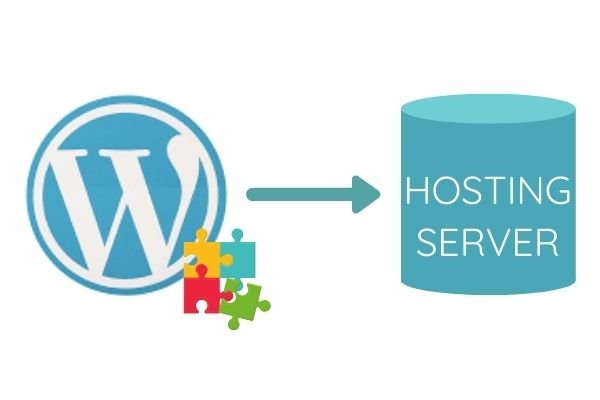
  • Uses “Plugins**” for functionality, which are a mixture of free and paid tools that range from social media icons, email sign-up boxes, SEO tools, etc. There are thousands, which are independently developed and vary in reliability, but offer huge flexibility (Jigsaw pieces)

  • Self-hosted *** – You find and pay a hosting company for server space, for your website to live on. If you go for this WordPress option you will need to research the prices, reliability and speeds that each hosting company offers

 * Open-source / free software that anyone can use and change

** Plugins / a bit of software that bolts onto your website to perform a specific task

*** Hosted / Self Hosted means you need to find server “space” for your website to live on the internet, Hosted means that the company providing the software will also give your website a “space” to live on their servers.

Option 2: WordPress.com (The name is misleading this is .com as opposed to .org)

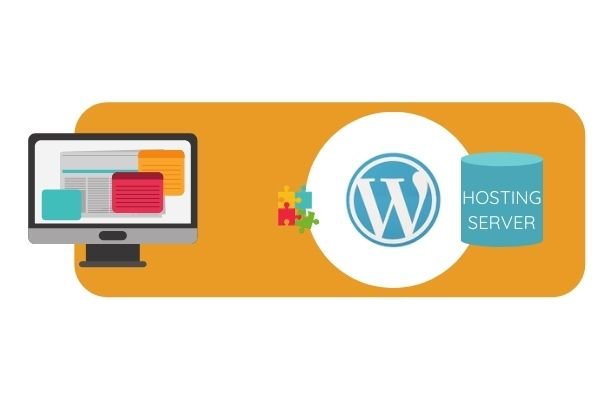
  • Paid software that covers the hosting too – this is a company effectively providing access to WordPress.org within their own builder and with their own hosting

  • Offers a more user friendly front end and templates with WYSIWYG drag and drop over the top of WordPress.org to help with the build (What You See Is What You Get)

  • Easy to moderate (technical skills strongly recommended for further development)

  • Uses “Plugins” for functionality, which are a mixture of free and paid tools that range from social media icons, email sign up boxes, etc. There are thousands, which are independently developed and vary in reliability, but offer huge flexibility.

Option 3: Drag & Drop Page Builders eg. Divi, Elementor, Beaver Builder etc.

  • Paid software

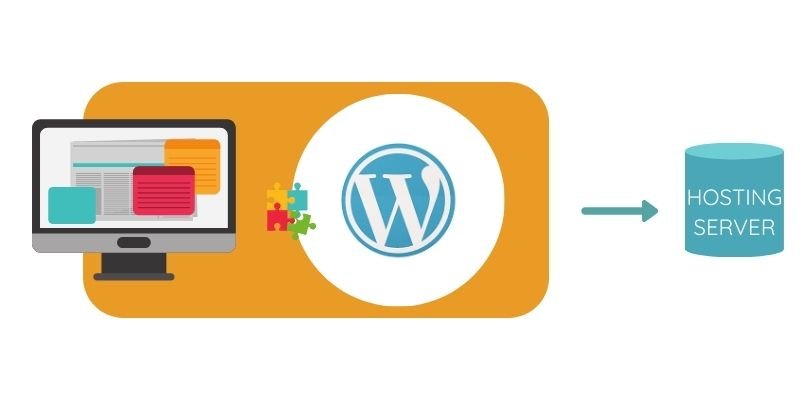
  • Offers a front end and templates with WYSIWYG sitting over the top of WordPress.org to help with the build. There are many companies offering their own versions of this.

  • Easy to moderate (technical skills strongly recommended if development required)

  • Uses “Plugins” for functionality, which are a mixture of free and paid tools that range from social media icons, email sign up boxes, etc. There are thousands, which are independently developed and vary in reliability, but offer huge flexibility.

  • Self hosted – You find and pay a hosting company for server space, for your website to live on. If you go for this WordPress option you will need to research the prices, reliability and speeds that each hosting company offers. The Website Builder may offer a hosting option of their own too

NB, With any of these WordPress.org options if there is a problem you will need to go to the company, forums or hosting platforms that deal with that particular element, there is no one point of contact. You will need to take control or pay an expert to act for you in the event of a crash, hack or problem. WordPress.com can offer a little more centralised support.

Wix – A quick overview

  • Paid software that covers the hosting

  • Simple drag and drop (WYSIWYG)

  • Unstructured – you can arrange anything, anywhere, in any colour size etc. for complete freedom, as per WordPress

  • Moderately easy at entry-level (you can hire help if you need extra coding and development)

  • Uses “Plugins” for additional functionality beyond what is included in the basic offering, which are a mixture of free and paid tools. Check their website for a fuller list

Squarespace – A quick overview

  • Paid software that covers the hosting

  • Simple drag and drop (WYSIWYG)

  • Structured – Snap to grid layout, curated and controlled palette, fonts and spacing etc. for a very design led feel

  • Easy (you can hire help if you need extra coding and development)

  • Most of the functionality is already inbuilt as part of the offering, though 3rd party integrations are available. You won’t need a raft of plugins in the way Wix and WordPress do.

At this point, I’m going to narrow the conversation to WordPress and Squarespace and try to remain impartial with the commentary.

Anecdotally, WordPress sites rank higher on organic searches (pop up near the top when someone searches Google but not as an ad) than those built on other platforms, but I’ve listened to experts explaining, very credibly, that this is in large part because these websites are being built by experienced web developers who understand and know how to optimise SEO. If the content of your website is good and the SEO fields are used correctly, then there’s no significant advantage.

The platform doesn’t dictate SEO success, the knowledge of SEO good practice does!
(at least at entry level)

An other argument that you’ll hear is that Wix, Squarespace, and other such platforms have a slow “Architecture” (the way their software is built) and get penalised by Google.

That’s true, BUT, can also be said of Divi, Elementor, and WordPress.com.

WordPress.org used without an additional builder is fast, Google can get straight to the data without any obstacles that the Web Builder platforms use, but once you start adding plug-ins to any WordPress-based site, the speed gets slower with each and every one. The choice of hosting company will also play a major factor with any website, though isn’t an issue to worry about with Hosted options.

When all is said and done, you just need to keep your design, content, and images well prepped, whichever option you select. Whichever platform you choose all the prep work and planning should be the same. (I’ve written a course that takes you through all these steps – It’s exactly what I wish I’d had when I started website building but hindsight is 20:20 vision)

Website Platform Pros & Cons

I’m not pretending to have covered everything but I’ve tried to capture important stuff and key points of difference.

DESIGN

SQUARESPACE

PROS

    • Guaranteed consistent, sleek, elegant, professional, sharp look

    • Takes a lot less time to build, as 90% of the distraction is removed

CONs

    • Much less creative freedom unless you use CSS (not too difficult – lot’s of online code and help)

WORDPRESS

PROs

    • Total freedom of design

CONs

    • Unless you’re a talented graphic designer there’s a strong risk that you’ll end up with a messy design stew

    • Creative freedom is a time thief, prepare to lose hours or days playing around

FUNCTIONALITY

SQUARESPACE

PROs

    • The most complete choice off the shelf. Functionality that other platforms offer as plugins are generally standard offering within Squarespace, with no hidden costs or dealing with a secondary supplier. Please don’t confuse plugins and use of other packages altogether such as Acuity or Calendly etc.

    • All updates and development are centrally created so no risk of incompatibility developing with a plugin and only one point to contact for help.

CONs

    • It doesn’t have absolutely everything (nothing does) but there are a wide range of 3rd party plugins being created for Squarespace now with easy code injection. It’s always important to check cost of any extra software.

WORDPRESS

PRO’s

    • With 1000’s of different plugins to choose from (some free some chargeable), more flexibility, BUT the relevance of this depends on your business plans and process / activity requirements.

CON’s

    • Need to carefully scope out costings as the monthly costs could grow more than anticipated.

    • Each plugin is created by a separate business and longterm compatibility and support aren’t guaranteed.

    • Too much choice when it comes to plugins. Just because they exist doesn’t mean you need them. Be careful not to get distracted with shiny object syndrome and work out what you really need.

TEMPLATES & THEMES

PROs

    • Squarespace 7.1 doesn’t need any change of templates or theme, the are multiple layout building block options available as standard or you can start from a blank page. The colours and fonts are easily set centrally. It’s hard (not impossible) to make a messy website in Squarespace.

    • 1000’s of Themes to choose from for free with any of the WordPress builders, alternatively you can buy a Theme from a designer. Buying a designer theme is a great way of getting a professional designer look without design skills.

    • You can build from scratch using a builder, without advanced technical skills (that isn’t to say it doesn’t take some design skill and perseverence).

CONs

    • WordPress.org provides great scope – but only for the technically skilled!

    • Themes may go out of date or become unsupported. Designer themes could also be used by your competitors, giving your sites very similar vibes.

ECOMMERCE

  • Squarespace – Functionality included in the plans as standard, more advanced functionality available in higher-level packages.

  • WordPress – Ecommerce chargeable Plugins such as Shopify, WooCommerce (Both of which can also be used stand-alone), so the cost should be added to the monthly costs when comparing.

SUPPORT

Squarespace definitely has the edge for non tech end users. You have direct access to the company that write the software, maintain the updates and do the hosting, something that simply isn’t possible with WordPress. Squarespace has online live chat 16 hours per day with fantastically helpful staff who go out of their way to help, and you can click to get a transcript of the live chat emailed through afterwards for reference.

CHANGING TO A DIFFERENT WEBSITE PLATFORM

This might seem an odd thing to consider at this stage but it’s important to know. Squarespace includes an export function that will export your web content to WordPress files (I’m not sure about images but it’s recommended that you keep backups of those anyway). This means that should you change in the future you aren’t starting completely from scratch.

People will tell you that you don’t “own” your website if you use Squarespace because they own the software and control the hosting. I’m possibly missing something because I don’t own Divi, WordPress, or any of the hosting either, I’m effectively leasing or buying access. Ultimately it is the content that matters and as I’ve just explained, this can be exported out of Squarespace and imported into WordPress. WIth regards to “Owning” and WordPress. If you are with a host you don’t like, you can just move the site without any rebuilding layouts (content already there) – perhaps this is what is meant.

When all is said and done, both platforms will do the job and if they don’t there’ll be a plugin or 3rd party way around it.

Check what your requirements are going to be and see whether they can be catered for.

Personal bit…

I’ve used WordPress, Wix, and Squarespace

I honestly love both Squarespace and WordPress!

I was resistant to WordPress for years but now use it and love it but it is significantly more time-consuming and more complex to use. It’s also more demanding in terms of maintenance, but it gives me so much scope to create gorgeous sites.

Probably on the basis of thoughtfully crafted software that’s a pleasure to work with for hours each day to create beautiful sleek sites, Squarespace would be my personal choice, that said, I’ve very happily constructed my site “The Business Whisperer” on WordPress. You can take a look in the Portfolio on that site to see the results on each platform, it’s clearly marked which I’ve used.

Nothing is 100% perfect but I’ve wasted far less time and achieved distinctly more polished results aesthetically with Squarespace, as its inbuilt design rules far exceeded my early creative endeavors in the early days. I’ve not yet found anything I’ve not been able to do in Squarespace. I’ve maybe had to rethink my approach occasionally and any compromise has been something I could live with.

WordPress is amazing once you start getting to grips with it but the learning curve is significantly steeper and I would argue that if you aren’t using a Theme you need a stronger design eye.

When all is said and done I’m here to help you choose the best option for you, neither are perfect and both have great strengths too. I’m happy using either.

DECISION TIME

  • Don’t agonise over this for too long, whatever you choose will work

  • Nothing will be perfect

  • Everything will have pros and cons

  • Don’t have sleepless nights hunting that elusive magical unicorn that you know doesn’t exist

“The risk of a wrong decision is preferable to the terror of indecision”

– Maimonides


Would you like to some friendly impartial advice?

Why not book a …